Keyboard, mouse, pen, and touch address the same controller. The default bindings are a starting point, not a host policy: choose the chords and labels that fit the application around your workspace.
Action matrix
“Host control” below means a button the application supplies and wires to a controller method or the root ref's run(command). There is no built-in toolbar for every command. In arrange mode, #arrange { run, done } lets the host provide touch-friendly controls without inventing another API.
| Action | Keyboard default | Mouse / pen | Touch |
|---|---|---|---|
| Focus pane | Alt+Shift+arrows or H/J/K/L | Press content | Tap content outside arrange mode |
| Extend selection | Ctrl+Alt+Shift+arrows or H/J/K/L | Rectangle chord click | Arrange long press selects rectangle |
| Toggle selected pane | Alt+Shift+M, then pane letters | Alt+Shift click | Arrange tap |
| Select rectangle | Extend selection or host control | Ctrl+Alt+Shift click from focused pane | Arrange long press |
| Split right / below | Alt+Shift+E / O | Drag to edge quarter, context menu, or host control | Armed label / arrange drag to edge, menu, or host control |
| Split left / above | Keyboard move + arrow, menu, or host control | Left / top drop or menu | Left / top drop or menu |
| Tab next to | Alt+Shift+T | Drop on bar marker or host control | Armed drop on bar or host control |
| Tabs inside | Alt+Shift+I | Middle drop, context menu, or host control | Middle drop, context menu, or host control |
| Group target | Alt+Shift+G | Host control | Host arrange control |
| Move pane / selection | Alt+Shift+V, destination letter, arrow / Enter | Alt+Shift drag | Arrange drag |
| Move one tab | Menu picker, then 1–9 | Drag label or context menu destination | Hold label then drag, or menu picker |
| Show a tab | Alt+Shift+[ / ] | Click label | Tap label |
| Rename tab | Menu Rename; Enter commits, Escape cancels | Double-click label or menu Rename | Hold label, choose Rename |
| Reorder tab | Focus label; Alt+Shift+Left/Right, Up/Down for side bar | Drag to insertion marker | Hold label and drag to marker |
| Rotate bar | Alt+Shift+R | Host control | Host arrange control |
| Resize side bar | Host control | Drag inner edge | Drag inner edge |
| Reset side bar width | Host control | Double press inner edge | Double press inner edge |
| Zoom / restore | Alt+Shift+Z | Host control | Four-finger pinch out / in |
| Close target | Alt+Shift+X | Close selection control, tab close, menu, bin | Same controls, or drag to bin |
| Undo close | Alt+Shift+U | Host undo slot | Host undo slot |
| Equalize cut run | Alt+Shift+=; Enter on divider | Double press divider | Double press divider |
| Resize cut | Alt+Shift+, / . nudges 24 px | Drag divider | Drag divider |
| Toggle arrange mode | Alt+Shift+A | Hold divider still | Four-finger hold or divider hold |
| Display pane numbers and focus | Alt+Shift+Q, then 1–9 | Click a displayed number | Tap a displayed number |
| Exit innermost mode | Escape / Ctrl+G / Ctrl+D (independent of keymap) | Outside press cancels menu / picker | Outside press cancels menu / picker; host Done exits arrange |
| Clear selection / bar focus | Escape when bound to clear, outside modes |
Host control | Host control |
The matrix uses library defaults. The Workbench deliberately changes pane toggle and move to Ctrl+Alt+Shift and disables the rectangle chord until “library-default” chords are chosen. Do not infer defaults from a host demo.
Unified modal exits
Arrange isolation and action menu
While arranging, EVERY keydown/keyup and pointer/mouse/click/double-click, context-menu, wheel and touch event is cancelled in capture, including both propagation stops. Only library arrange UI (pane covers, bar labels, menus, bin, #undo and the host's #arrange slot) can receive interaction. The shell sends arranging to pane iframe helpers; their content receives no input or claimed notifications. Letter selection skips q. Plain physical Q is an arrange-only exit: arrangeExitKeys defaults to ['KeyQ'] and adds to exitKeys; null or [] adds none. Every arrange exit clears selection and bar focus, including Done, command toggle and four-finger hold. The bound arrange chord exits the mode (Alt+Shift+A by default); other layout chords stay swallowed. Tab/Shift+Tab cycle enabled controls in the host Done slot, library menus and undo slot, never page or pane content or the pointer-only drag bin. The inline rename editor retains its typing keys and Escape. Invalid arrangeExitKeys chords throw at mount, like invalid exitKeys.
Supply labels.arrangeMenu for the bottom-right action button. The button hides during drags, where the bin occupies the same place. Supply arrangeMenuLabels and optionally the ordered arrangeMenuItems subset for placeholder splits on all four sides, tab next to, tabs inside, group, zoom/restore, bar side, close target, undo and Done. Missing labels hide items; refusal reasons are host-supplied through arrangeMenuLabels.reasons. Commands use selection, else focus. Group requires two selected panes; Undo appears only when available. The host still owns the position and contents of #arrange { run, done }, including a larger Done button with an icon.
Exit policy
SplitTabs.exitKeys?: readonly string[] | null defaults to the exported defaultExitKeys: ['Escape', 'Ctrl+KeyG', 'Ctrl+KeyD']. These exits belong to the library, not the host's command keymap; replacing the keymap or setting it to null does not disable them. exitKeys=[] or null disables them. Chords use the same strict validation as keymaps: physical codes, exact modifiers, and no AltGraph.
While a mode is active, a window capture listener exits arrange together with its drag/menu/picker; outside arrange it exits the innermost mode. The library prevents default and stops propagation and immediate propagation of keydown, repeats and keyup, so input fields, contenteditable and terminal content receive none of that exit press. Listeners end with the mode and its consumed release, and on unmount. Iframe helpers receive active exit chords on mode changes and apply the same capture rule. With no mode active these keys are untouched unless separately bound to a command. clear remains a separate command for selection and bar focus.
The inline title editor is a text field: it owns its typing keys, including Escape, even during arrange mode. Escape cancels only the edit; Enter or blur commits the trimmed value. Leaving the strip or unmounting commits an unfinished edit exactly once, like blur. Pickers leave editor typing and Enter alone; modifier releases still update pane covers. Empty clears the custom title. Every tab is renamable by default (views, layouts, inner bars); hosts can disable it with renamable: false or a per-key predicate. The rename menu item requires host menuLabels.rename; labels.renameInput supplies the input's accessible name. Hosts rendering #tab receive title: string | null and should use it before their own fallback label. The default bar already does this.
Exact default keymap
This table is generated at build time from the built library's defaultKeymap. Chords name physical KeyboardEvent.code keys rather than the characters produced by the current keyboard layout.
Chords require the exact modifier set: Ctrl+Alt+Shift does not match Alt+Shift. AltGraph is typing, never a layout chord or pane cover. Outside arrange isolation and modal exits, unbound keys are never cancelled. On the host page a refused or no-op command leaves the character to the page; a successful command wins even in input, textarea and contenteditable fields. Hosts must choose non-clashing bindings. Non-repeatable commands run once per held physical key: repeats follow the first keydown's cancellation decision without running another command. A successful first press takes its repeats; a refused, no-op or unbound first press leaves repeats to typing. The shell remembers this per key code until keyup or window blur. An orphan repeat cannot start a non-repeatable command. Focus, selection extension, tab switching and resize nudges repeat. In iframes every bound keydown is taken, even on refusal or repeat, because the helper cannot synchronously wait for the shell verdict.
pick, move, and arrange always succeed; tabNext and tabInside succeed unless a selection cannot be grouped; splitRight and splitBelow succeed whenever the target has room for two panes. Their default bindings take the macOS Option+Shift+M/V/A and Option+Shift+T/I characters, and Option+Shift+E/O when there is room: those characters cannot be typed in host fields while the default keymap is active, even with one pane. Rebind them or use a null keymap when those characters must be available. Inside iframes every bound chord is taken, including commands that are later refused.
| Command | Physical chord |
|---|---|
focusLeft |
Alt+Shift+ArrowLeft, Alt+Shift+KeyH |
focusDown |
Alt+Shift+ArrowDown, Alt+Shift+KeyJ |
focusUp |
Alt+Shift+ArrowUp, Alt+Shift+KeyK |
focusRight |
Alt+Shift+ArrowRight, Alt+Shift+KeyL |
extendLeft |
Ctrl+Alt+Shift+ArrowLeft, Ctrl+Alt+Shift+KeyH |
extendDown |
Ctrl+Alt+Shift+ArrowDown, Ctrl+Alt+Shift+KeyJ |
extendUp |
Ctrl+Alt+Shift+ArrowUp, Ctrl+Alt+Shift+KeyK |
extendRight |
Ctrl+Alt+Shift+ArrowRight, Ctrl+Alt+Shift+KeyL |
splitRight |
Alt+Shift+KeyE |
splitBelow |
Alt+Shift+KeyO |
tabNext |
Alt+Shift+KeyT |
tabInside |
Alt+Shift+KeyI |
group |
Alt+Shift+KeyG |
barSide |
Alt+Shift+KeyR |
pick |
Alt+Shift+KeyM |
move |
Alt+Shift+KeyV |
arrange |
Alt+Shift+KeyA |
zoom |
Alt+Shift+KeyZ |
close |
Alt+Shift+KeyX |
undo |
Alt+Shift+KeyU |
previousTab |
Alt+Shift+BracketLeft |
nextTab |
Alt+Shift+BracketRight |
equalize |
Alt+Shift+Equal |
shrink |
Alt+Shift+Comma |
grow |
Alt+Shift+Period |
clear |
Escape |
displayPanes |
Alt+Shift+KeyQ |
On a focused tab label, reorder chords take precedence over layout focus navigation. The label stays focused and the shown tab does not change. Labels are ordinary named buttons with aria-pressed, not ARIA tablist/tab roles; host slot content supplies their accessible names.
pick is the command that starts letter selection (Alt+Shift+M). The numbered move-a-tab picker is separately entered through the menu or useSplitTabsPick().start(tabId). Keyboard move (Alt+Shift+V) carries the selection or focused pane: choose a letter, then an arrow to split or Enter to drop inside. Alt+Up/Down or PageUp/PageDown widens/narrows the destination through controller.scopes. Unified exit keys, outside presses, and pane changes cancel picker modes.
Win / Super and host shortcuts
Meta includes the physical Win/Super key even when WebKitGTK reports OSLeft / Super but never sets metaKey. The library observes the MetaLeft/MetaRight/OSLeft/OSRight codes or Meta/Super/OS/Hyper keys, combines held state with native Meta flags, and clears it on release or hidden visibility, and on a window blur only when focus has not returned within 500 ms (Unity/compiz blur and refocus the window about 30 ms after a Win press). Commands, exit keys, pointer chords and label reorder all use the same effective modifiers; iframe reports carry effective Meta too. AltGraph never becomes a chord.
Hosts use createChordTracker(target?: Window, trusted?: (event: KeyboardEvent) => boolean) before modifier presses and tracker.matches(event, 'Shift+Meta+KeyW') for their own shortcuts. Matching uses the same strict validation, physical codes and exact modifier set as library commands. tracker.modifiers(event) returns effective flags; tracker.dispose() releases shared per-window observers. See the API reference and README for the lifecycle example. By default only trusted keyboard events update physical-key state. Synthetic picker/menu replays cannot hold or release modifiers and omit modifier keys.
Native-shell capture and replay
A native shell can take layout keys before any web content, including an uncooperative cross-origin iframe. Follow capture(policy: SplitTabsCapture): take chords always; when the keyboard is in content the page cannot see, also take exitKeys, captureKeys, and every key while arranging. Replay taken keydown and keyup on document.activeElement as bubbling, cancellable KeyboardEvent~s with physical ~code, key, repeat, modifier flags and Win/Super as metaKey. Replay modifier presses/releases too, so pointer chords cover panes. All live per-window trackers share observers: create the app's tracker with a trusted predicate accepting physical events and its own vouched-for replays before the key presses it must observe. Any live predicate may vouch for an event; disposal removes that predicate. A pending blur clear drops only Win/Super ids held at blur time, not new replayed presses. See the API reference for the policy lifecycle and README for host guidance.
Display panes
run('displayPanes') or useSplitTabsPick()?.displayPanes() shows the shared numbered picker badges for displayPanesTimeout ms (default 2000). Numbers read across rows, left to right, then top to bottom. Scanning pane tops from top to bottom, a new row starts at or below the current row's first pane's vertical midpoint. Small divider offsets and frame bars do not reorder overlapping panes. Plain 1–9 focus that pane and its keyboard, then end display; keyboard handoff waits until the digit release is consumed. 0 is not a tenth-pane shortcut, and higher-numbered panes remain clickable. Invalid digits are consumed without moving focus. Unified exits cancel unchanged. Digits and exits own down, repeats and keyup in capture, including inside pane iframes and when the keyboard moves to another pane.
Any other initial keydown ends the mode without consumption; auto-repeats alone never end it, including the opening chord's repeats. Typing/normal commands continue. Every press ends it, and pressing a badge focuses its pane. Timeout, pane-set changes, unmount and reentry clean up the timer and mode listeners. Workbench also binds Shift+Meta+Q to this command as a Win/Super example.
Pointer chords and content ownership
The default pointerChords are { toggle: "Alt+Shift", rectangle: "Ctrl+Alt+Shift", move: "Alt+Shift" }. They match exactly the modifiers held. A value of null disables that action. While an enabled chord is held, covers above overlay content receive layout clicks and drags; otherwise a press focuses the pane and belongs to its content. The first toggle also takes the focused pane into selection.
Mouse drags begin after more than 6 px of movement. A label touch/pen press must hold 350 ms first; moving more than 6 px before arming cancels it and leaves the gesture to browser scrolling. An armed touch drag prevents panning until it ends. Unified exit keys and pointer cancellation clean up the drag. Internal drags cannot target another SplitTabs root.
Drop zones and spring-loaded tabs
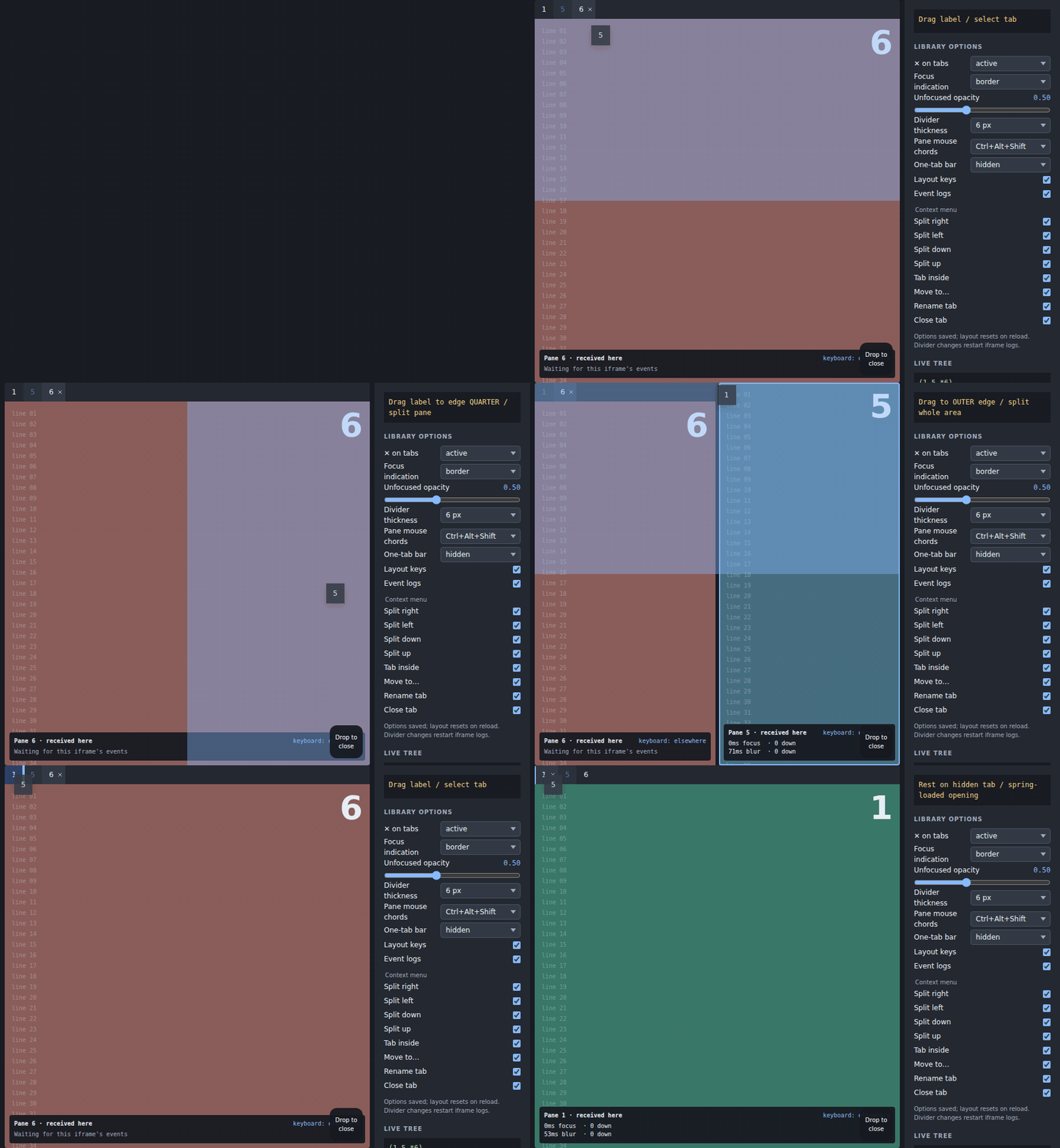
| Zone | Result |
|---|---|
| Tab bar | Add next to its tabs at the insertion marker. |
| Hidden one-tab pane's would-be bar strip | Preview the shown tab; drop adds next to it. No strip on the source itself. |
| Groupable multi-pane selection, outside source | One cluster: popped top bar adds beside group, content quarters split group, middle adds inside. |
| Pane middle | Add inside the shown content, creating an inner bar where needed. |
| Pane outer quarter | Content goes on the indicated side; an own-pane drop creates a new placeholder opposite. |
| Thin frame band | Split beside the entire framed tab set. |
| Thin root band | Split the entire root area. |
| Bin while dragging | Close the internal dragged view, pane, or selection, if closable. |
The library bar is a sibling outside the pane. Its rectangle is never a pane middle or quarter zone, and pane covers/arrange badges never cover its controls. Frame/root edge bands still refer to the outer frame/root box.
The cluster rectangle includes member tab-set boxes and frames whose panes are all members. It overrides every member zone, including real bars, but bin/root and non-member frame bands retain precedence. Sources overlapping ANY view in ANY member tab, and selection sources, do not activate it. The one-tab bar pops out on entering ANYWHERE in that rectangle, unless the prospective group is already a direct tab of a visible holder bar. With a popped bar the content excludes its strip; without one quarters/middle use the full rectangle and the real holder bar remains a target.
Hidden pane strips use their configured side and bar dimensions; their remaining content supplies the quarters/middle, just like a visible bar. Both previews share .split-tabs-bar-preview, active item/title/tab classes and the host's tab slot/class. They are inert overlays above Keep content, below the marker, not real hit-test targets. Hover resizes and saves nothing; leaving the zone or ending/cancelling the drag removes them. Grouping is applied only on a successful drop, which writes once.
Self-drops of a pane or its SHOWN label split INSIDE the shown tab, even in a multi-tab pane. The other tabs stay untouched; the shown entry becomes a layout tab, active in the same bar. Its content stays on the dropped side; a fresh placeholder takes the other half and focus, like split(). For (A *B), a right drop gives T{A | *H[new:1 B]}; switch to A and back to B's layout to recover the split. A one-tab bar dissolves into the cut. A NON-shown label dropped on its own pane edge still separates alone, with no placeholder. Frames keep their whole tab set on their own outer band. The only visible tab follows the shown-tab rule, preserving hidden siblings outside the split. Keyboard move (own letter, then an arrow) and tab-menu direction actions support the same self-split rule. A pane drag onto its own middle returns into-itself; a lone tab label on its own middle or bar returns nothing-to-move. Neither writes storage or changes intent. Insufficient space for equal halves and their minima/divider returns no-room without a write. A selection may self-split only when its grouping plan is single.
The preview shows BOTH halves: the content shade on the dropped side and .split-tabs-drop-preview--new opposite, with optional host labels.newPane text. Both show refusal when the split cannot fit. Theme the new half through --split-tabs-drop-new-background and --split-tabs-drop-new-shadow.
Resting over another tab during a drag spring-loads it open, exposing a destination that was hidden. Watch the preview shade and marker: a refused preview is not a partial move. External drags use the same destination model but the bin is for closing internal items. The host owns the external source threshold and registers the id only on a valid handoff.
Dividers and side bars
A press/release on a divider without movement does not commit. A real drag updates live ratios and commits once at release. Two presses within 350 ms equalize; this works on touch without relying on a browser double-click. Holding still for 500 ms toggles arrange mode. A keyboard-focused divider equalizes on Enter.
Equalization spans the maximal rendered run of same-axis cuts, treating frames and collapsed subtrees as single segments. It distributes free space around effective minima rather than collapsing an inner split. Live drags snap divider centre to parallel divider centre within 12 px and draw a guide; they do not snap to pane edges. Clamps include full subtree minima.
Left/right bars resize from their inner edge. setBarWidthLive moves the layout and overlay content without a write; setBarWidth commits once. Width never falls below sideBarWidth. Double press restores the default. During drags and resizes, iframe/overlay pointer events are disabled so the gesture remains owned by the layout.
Four-finger gestures and arrange mode
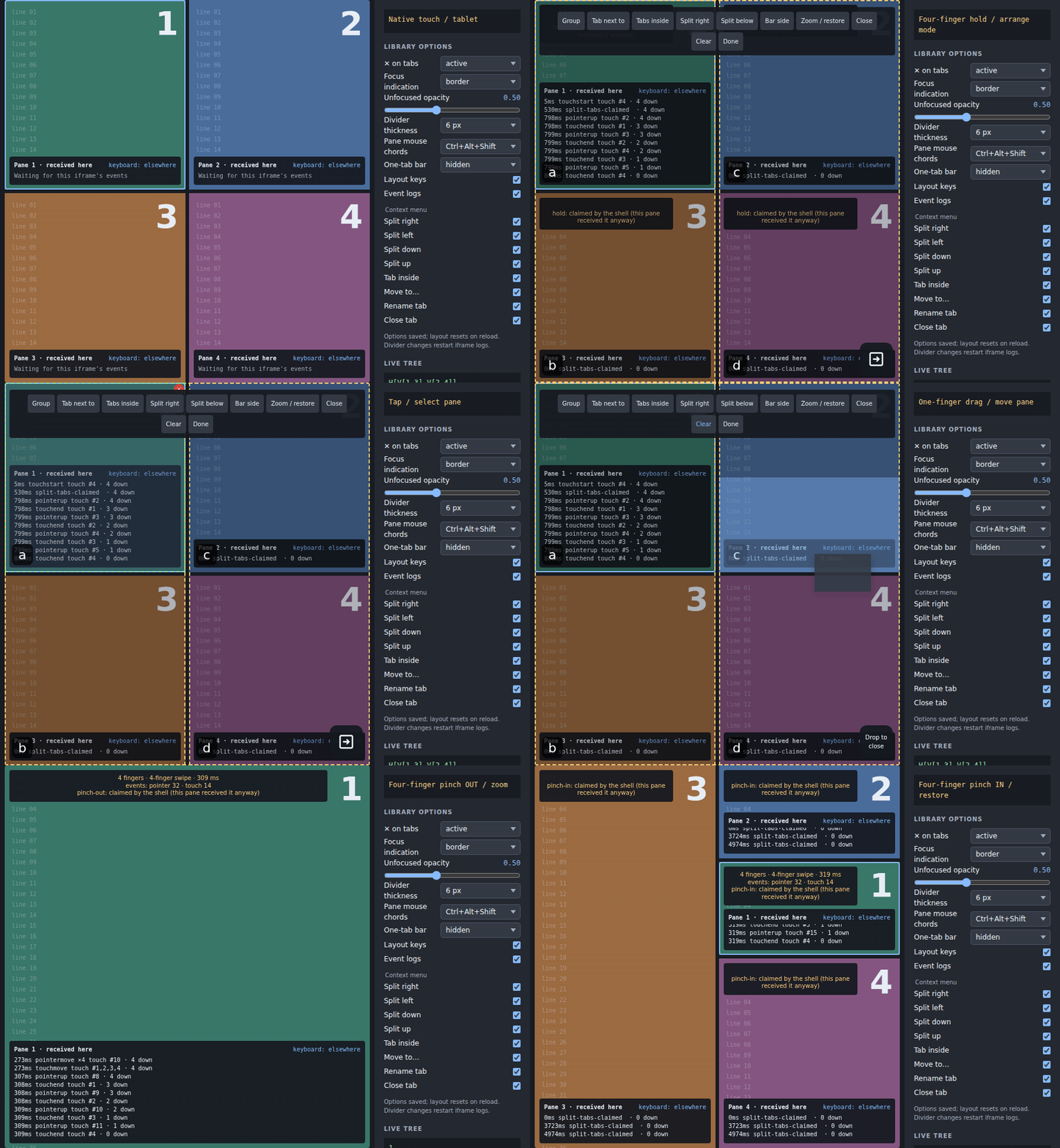
A four-finger hold toggles arrange mode. Four-finger pinch out zooms the pane under the fingers, or the selection when one exists; pinch in restores. Arrange covers let taps toggle panes and drags move them without modifiers; the host can render its own command strip and visible Done control in #arrange { run, done }; wire that host-labelled button to done(). The library supplies no built-in wording. Cooperating iframes report fingers to the shell; ordinary iframe events do not bubble out.
From the third finger, on the page or in a cooperating iframe, the touch sequence belongs to the layout: touchstart and touchmove are cancelled so the browser never pans and the content under the fingers never scrolls, and every pane is covered until all fingers lift, so a four-finger pinch or move touches nothing underneath. One and two fingers keep scrolling and zooming content; what they did before the third finger cannot be undone. Touch events are the source of truth; touch pointerdowns and iframe down reports count as provisional fingers and arm the owning iframe's blocker immediately. Chromium routes touches to the first finger's document, even when later fingers land elsewhere. Touch snapshots replace hints; pointer up/cancel drops only unmatched hints, so Android WebView's pointer cancellation cannot break a continuing touch hold or pinch. Other-document touches are checked against this root's geometry: fingers outside it never count.
Context menus and close controls
Supplying menuLabels enables labelled items in the root-owned menu. Right-click opens at the pointer; a touch/pen hold arms at 350 ms and opens on release without dragging. ContextMenu or Shift+F10 opens below a focused label. ArrowUp/Down cycles enabled items; Enter/Space activates; unified exit keys or outside press closes and restores label focus. Placement flips and clamps inside the viewport.
Default item order is right, left, down, up, inside, move, close. Direction items split toward that side: a shown tab (including a lone visible tab) splits inside its shown entry with an opposite placeholder; a non-shown tab separates alone. menuItems can reorder or restrict it; [] disables the default items. Missing labels hide items, and no labelled available item leaves right-click to the browser. otherPane replaces the move label with exactly two panes; three or more use numbered destinations. noRoom and onlyTab label disabled reasons. menu is the accessible menu name.
Append host actions through #menu-extra { tab, tabSet, close }. Give a button role="menuitem" and class="split-tabs-menu-item" to join the shared navigation, and call close() after acting.
closeButton is active by default: only the shown closable tab gets an ×, so clicking another label can never close it. hover also shows one under the pointer or keyboard focus; always shows every closable tab's; never shows none. Root stripLabels.close is still required. Non-optional host views never become closable just because the close-button policy changes.
Override only your host policy
<SplitTabs :controller="controller" :labels="{ divider: 'Resize panes' }"
  :keymap="{ ...defaultKeymap, close: ['Ctrl+KeyW'] }"
  :pointer-chords="{ ...defaultPointerChords, toggle: 'Ctrl+Alt+Shift',
    move: 'Ctrl+Alt+Shift', rectangle: null }"
  close-button="hover"
  :strip-labels="{ close: 'Close view', resize: 'Resize side bar' }"
  :menu-labels="{ menu: 'View actions', right: 'Move right', close: 'Close' }"
  :menu-items="['right', 'close']" />
Import defaultKeymap and defaultPointerChords from the main package. Pass keymap=null to disable layout bindings altogether; controller methods and run remain available. Handle @command="(name, result) => …" to turn reason codes into your own language. There are no built-in visible strings.